온습도 센서 DHT11에 대해 테스트하려고한다.
해당 센서는 다음 그림과 같이 생겼다
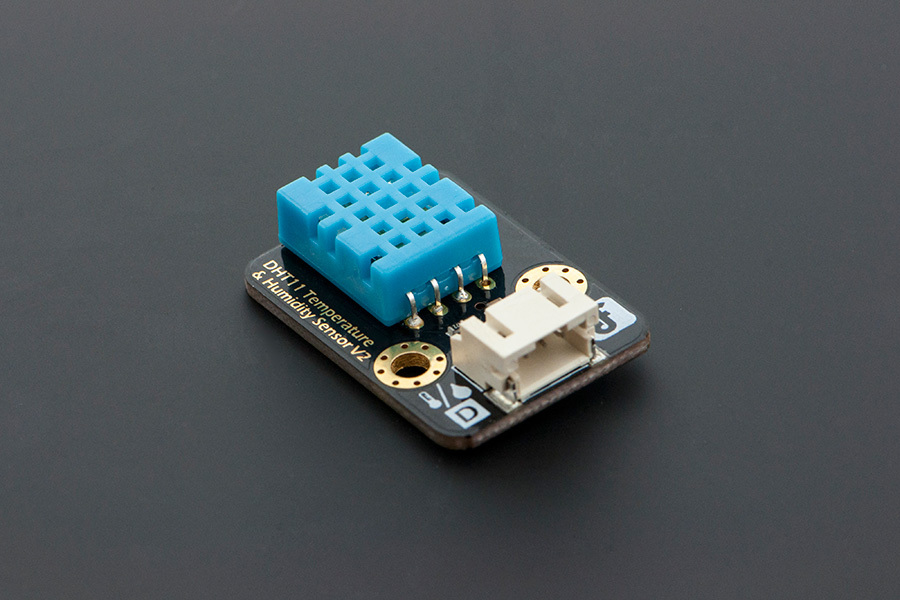
DFROBOT - DHT11
제조사만 DFROBOT 일뿐 DHT 11 센서는 일반적인 온습도 센서와 동일하다 (DHT11 이니깐 ..)
DHT11 센서의 작동 전압 : 3.3V~ 5V
온도 측정 범위 : 0 ~ 50도 (오차 +-2도)
습도 측정 범위 : 20 ~ 90% (오차 +-5% )
센서 인터페이스 : 디지털 (Digital)
DHT11 모듈은 약간 보급형... 느낌이며 DHT22 모듈이 좀더 정확하다
DHT11 연결 회로는 제공 케이블의 선 색깔로로 알수 있다.
녹색 : Signal
빨간색 : VCC
검정색: GND
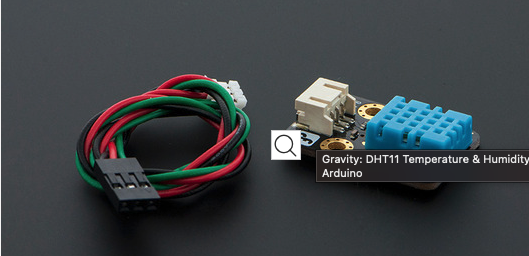
DHT11 (DFROBOT) 구성
DHT11 센서는 관련 라이브러리를 이용하여 정확한 수치 데이터를 읽을 수 있다. 인터넷에 많은 DHT11 라이브러리가 있으며 본 글에서는 아두이노 메인 홈페이지에서 관리하는 라이브러리를 다운로드 하여 실험 하였다.
해당 라이브러리에서 공개한 샘플 코드는 다음과 같다
// Example testing sketch for various DHT humidity/temperature sensors
// Written by ladyada, public domain

// REQUIRES the following Arduino libraries:
// - DHT Sensor Library: https://github.com/adafruit/DHT-sensor-library
// - Adafruit Unified Sensor Lib: https://github.com/adafruit/Adafruit_Sensor

#include "DHT.h"

#define DHTPIN 12     // Digital pin connected to the DHT sensor
                      // 연결 핀 번호

// Feather HUZZAH ESP8266 note: use pins 3, 4, 5, 12, 13 or 14 --
// Pin 15 can work but DHT must be disconnected during program upload.

// Uncomment whatever type you're using!
#define DHTTYPE DHT11   // DHT 11  !! 센서 종류 확인 !@
//#define DHTTYPE DHT22   // DHT 22  (AM2302), AM2321
//#define DHTTYPE DHT21   // DHT 21 (AM2301)

// Connect pin 1 (on the left) of the sensor to +5V
// NOTE: If using a board with 3.3V logic like an Arduino Due connect pin 1
// to 3.3V instead of 5V!
// Connect pin 2 of the sensor to whatever your DHTPIN is
// Connect pin 3 (on the right) of the sensor to GROUND (if your sensor has 3 pins)
// Connect pin 4 (on the right) of the sensor to GROUND and leave the pin 3 EMPTY (if your sensor has 4 pins)
// Connect a 10K resistor from pin 2 (data) to pin 1 (power) of the sensor

// Initialize DHT sensor.
// Note that older versions of this library took an optional third parameter to
// tweak the timings for faster processors.  This parameter is no longer needed
// as the current DHT reading algorithm adjusts itself to work on faster procs.
DHT dht(DHTPIN, DHTTYPE);

void setup() {
  Serial.begin(115200);
  Serial.println(F("DHTxx test!"));

  dht.begin();
}

void loop() {
  // Wait a few seconds between measurements.
  delay(2000);

  // Reading temperature or humidity takes about 250 milliseconds!
  // Sensor readings may also be up to 2 seconds 'old' (its a very slow sensor)
  float h = dht.readHumidity();
  // Read temperature as Celsius (the default)
  float t = dht.readTemperature();
  // Read temperature as Fahrenheit (isFahrenheit = true)
  float f = dht.readTemperature(true);

  // Check if any reads failed and exit early (to try again).
  if (isnan(h) || isnan(t) || isnan(f)) {
    Serial.println(F("Failed to read from DHT sensor!"));
    return;
  }

  // Compute heat index in Fahrenheit (the default)
  float hif = dht.computeHeatIndex(f, h);
  // Compute heat index in Celsius (isFahreheit = false)
  float hic = dht.computeHeatIndex(t, h, false);

  Serial.print(F("Humidity: "));
  Serial.print(h);
  Serial.print(F("%  Temperature: "));
  Serial.print(t);
  Serial.print(F("°C "));
  Serial.print(f);
  Serial.print(F("°F  Heat index: "));
  Serial.print(hic);
  Serial.print(F("°C "));
  Serial.print(hif);
  Serial.println(F("°F"));
}
코드 실행 결과
DHT11 예제 코드 실행 결과는 아래 그림과 같다

라이브러리 다운로드 경로
https://www.arduino.cc/reference/en/libraries/dht-sensor-library/
'basic > 아두이노 모듈' 카테고리의 다른 글
| 아두이노 배터리 용량 표시 - Battery Capacity Indicator (1) | 2023.10.09 |
|---|---|
| [Crowtail-Electromagnet] 전자석 모듈 (0) | 2023.10.08 |
| 수위 측정 Part1 - 비접촉 센서 활용 [XKC-Y26] (0) | 2023.10.04 |


